
Recording
Start, stop, pause, and resume recording, read live state, and wait for transitions.
These endpoints control live capture. Starting or stopping a recording has a real-world effect (it captures audio and fires the app overlay), so treat them as mutating actions and only call them when the user asked for that outcome.
Endpoints
| Method + path | Scope | Notes |
|---|---|---|
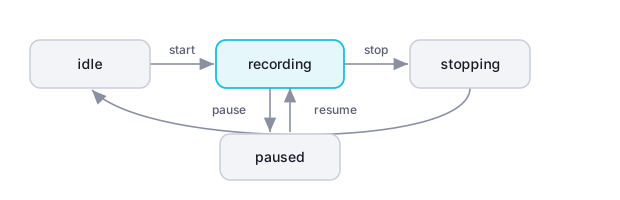
GET /v1/recording | Read | Current state: idle, starting, recording, paused, or stopping, plus the active meeting id if any, plus last_error (the last recording error, if any, with paths redacted: a home folder shows as ~ with the username removed, other absolute paths are reduced to just the filename). There is no CLI command for this, use curl or the SDK. |
POST /v1/recording/start | Record | Optional meeting_name, mic_device_name, system_device_name. Fast-acknowledges with a starting state; the recording itself spins up asynchronously. A remote (paired/LAN) caller must have remote_recording_prearmed set, or the call returns 403 not_prearmed. A consent_attested field is accepted but is a no-op. |
POST /v1/recording/stop | Record | |
POST /v1/recording/pause | Record | |
POST /v1/recording/resume | Record | |
GET /v1/recording/wait?until=started|stopped | Record | One-shot SSE, no CLI command. |
Read scope covers the microphone
Starting and stopping recording needs the Record scope, not Read. But a per-client token's baseline scope includes Record alongside Read, so a connected assistant can already start and stop the mic, not just read past meetings. The consent_attested field accepted on start is currently a no-op, do not rely on it for compliance. See Limitations and roadmap for the full picture.
Starting and stopping are also observable as events, recording.started and recording.stopped, on the Events and SSE page. Subscribe there instead of polling GET /v1/recording if you need to react the moment a transition happens.
Start recording
POST /v1/recording/start returns as soon as the request is accepted, with the state set to starting. The actual capture pipeline comes up a moment later; poll GET /v1/recording or use recording/wait?until=started to confirm it reached recording.
curl -s -X POST http://127.0.0.1:8420/v1/recording/start -H "Authorization: Bearer $MEETILY_PRO_TOKEN" -H "content-type: application/json" -d '{"meeting_name":"Standup"}'meetily-pro recording start --meeting-name "Standup"from meetily_agent import MeetilyClient
MeetilyClient().recording.start(meeting_name="Standup")Read live state
curl -s http://127.0.0.1:8420/v1/recording -H "Authorization: Bearer $MEETILY_PRO_TOKEN"# No CLI command for recording state yet - use curl or the Python SDK.from meetily_agent import MeetilyClient
print(MeetilyClient().recording.state())Wait for a stop
recording/wait is a one-shot SSE stream: the connection stays open until the requested transition happens (or the request times out), then it yields a single event and closes.
curl -N -s "http://127.0.0.1:8420/v1/recording/wait?until=stopped" -H "Authorization: Bearer $MEETILY_PRO_TOKEN"# No CLI command for the wait stream yet - use curl or the Python SDK.from meetily_agent import MeetilyClient
event, data = MeetilyClient().recording.wait(until="stopped")Lifecycle
Last updated on